
What Should Terminal Operators Do When Operations Software Goes Offline?





When terminal operations software goes offline, the immediate objective is not to recreate every digital workflow by hand. It is to protect people, equipment, cargo, and vessel commitments while preserving enough reliable records to reconcile the operation later. The wrong response is often trying to keep every gate, quay, yard, and planning activity running at normal speed without trusted system data.
What should we do when terminal operations software goes offline? Declare a controlled operating mode, identify the outage boundary, prioritize safety-critical and time-critical moves, activate a tested manual fallback process, and establish one source of operational truth until the terminal operating system is restored. The details matter because a short IT outage can become a longer yard-control problem if container locations, release status, or equipment instructions start to diverge.
First, distinguish a software outage from a terminal-wide loss of control
Not every failure requires the same response. A terminal operating system may be unavailable while gate kiosks, radio networks, crane controls, weighbridges, and vessel planning tools still work. In another event, the application may be running but receiving stale messages from customs, shipping lines, equipment-control systems, or the port community platform. Treating these situations as identical creates unnecessary disruption or, worse, allows operations to continue on unverified data.
The first decision should therefore be made jointly by terminal operations, IT, equipment control, security, and the duty manager: what information can still be trusted, what instructions can still be issued safely, and what transactions must stop? A dashboard that displays old data can be more dangerous than a visible outage because it creates false confidence.
Stabilize the operation before trying to maximize throughput
The duty manager needs authority to declare degraded operations. That declaration should trigger a short, practical command structure: one incident lead, one operations coordinator, one IT liaison, and named contacts for gate, vessel, yard, rail, and customer communication. Separate teams can still work quickly, but they should not each invent their own workaround.
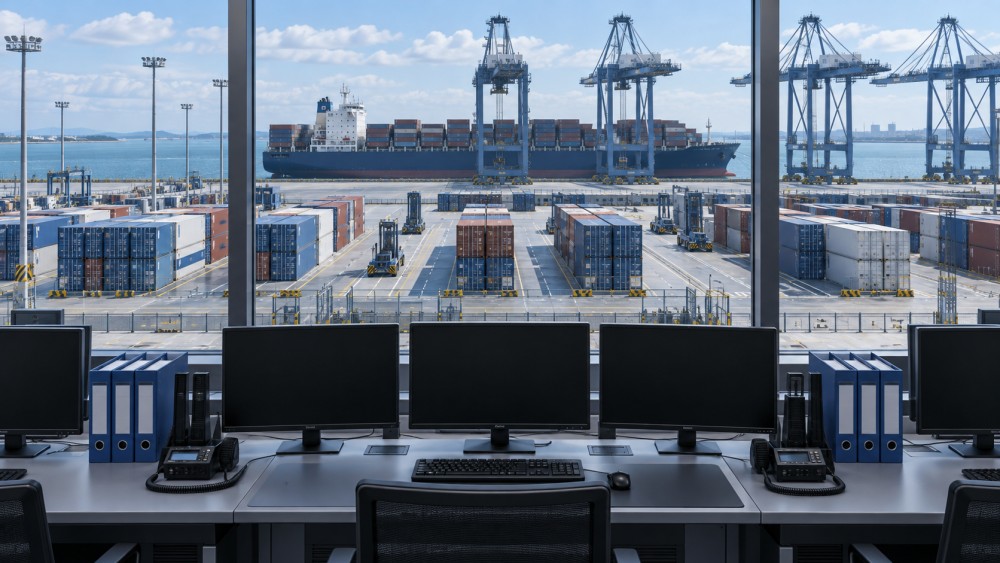
Safety comes first. Suspend moves that depend on system-generated positioning, automated routing, remote-control instructions, or uncertain cargo status. This is especially relevant at highly automated container terminals, where the terminal operating system is connected to crane scheduling, automated horizontal transport, stack logic, and remote operator workflows. A manual workaround is useful only where people can independently verify the instruction, physical location, and execution result.
Then establish the operational scope. Some terminals may be able to continue discharging a vessel into a designated buffer area. Others may need to stop discharge because the intended stack location cannot be confirmed. Gate activity may be restricted to empty equipment, pre-cleared priority cargo, or inbound flows that can be safely staged outside the normal yard. The correct choice depends on available space, cargo type, labor arrangements, weather, vessel windows, and the reliability of the remaining information.
Do not use a broad “business as usual” instruction. It causes conflicting decisions at the gate and in the yard, then turns recovery into a location-search exercise.
Choose the fallback model that matches the disruption
Terminal contingency plans commonly fail because they assume there is only one manual mode. In reality, the best fallback depends on whether the terminal needs to keep cargo moving, preserve a safe static position, or process a narrow set of exceptional transactions.
Controlled stop: best when data integrity is uncertain
A controlled stop means holding new moves, securing equipment, and maintaining only emergency or safety-related activity. It is the appropriate option when the terminal cannot trust container identity, hazardous cargo details, customs release information, stack location, or equipment instructions. It may look costly in the moment, but it prevents a much larger reconciliation problem and reduces the chance of an unsafe or unauthorized move.
Priority-only operations: best when the physical and commercial stakes are clear
This model keeps a tightly defined list of work moving: reefers requiring attention, critical vessel work, safety-related repositioning, or cargo with verified status and a simple route. Each move needs an explicit authorization, a unique transaction reference, a physical confirmation, and a person responsible for logging it. The list should remain short. Expanding it because every customer request sounds urgent is how a contingency lane becomes an uncontrolled parallel terminal.
Buffered operations: useful when the terminal has room to absorb uncertainty
Where a designated buffer area exists, the terminal can accept or discharge selected units without assigning their final operating location. This supports flow while the system is down, but only if the buffer is clearly marked, capacity-controlled, and recorded separately. A buffer is not an unplanned stack. Its purpose is to create an auditable holding area that can be reconciled quickly after restoration.
Manual records need structure, not just paper
Paper forms, whiteboards, handheld devices with offline templates, and radio logs can all support a fallback process. The medium matters less than the discipline. Every manual movement record should capture the unit identifier, activity type, origin, destination or buffer location, time, equipment or vehicle reference, operator, authorizing role, and any exception such as damage, seal concern, temperature requirement, or hazardous status.
A useful rule is that one move must produce one durable record. Avoid informal messages such as “box moved to the north end” or a shared spreadsheet where several people overwrite entries. They are difficult to validate after the event. If the terminal uses paper forms, number them in sequence and collect them through a designated control point. If handheld devices are used offline, prevent later editing without traceability.
Manual logs should also separate planned work from completed work. A vessel coordinator may authorize a discharge sequence, but the record of a completed move must come from the person who can confirm it physically. That distinction limits errors when plans change due to crane availability, weather, obstructed access, or a misplaced unit.
Gate, yard, and vessel teams should not use the same rules
The terminal is one operation, but its exposure changes by work area. A single generic outage procedure usually creates gaps.
- At the gate: verify driver identity, booking or release status, and cargo eligibility before allowing entry or exit. If those checks depend on unavailable or unreliable systems, restrict transactions rather than accepting later disputes. Use an exception lane with a supervisor approval trail for approved priority movements.
- In the yard: limit reshuffles and avoid spreading manual work across multiple blocks. Maintain clear physical location references. If stack coordinates cannot be confidently recorded, use a controlled buffer instead of placing units into normal stack positions.
- At the quay: balance vessel productivity against the ability to track each discharged or loaded unit. Continue only when the discharge area, sequence, and recordkeeping process are controlled. Loading is particularly sensitive because the wrong unit, weight status, or cargo condition can create downstream safety and documentation issues.
- For rail and intermodal handover: do not assume a train list or interchange record is valid simply because it was printed before the outage. Confirm the latest working version and isolate changes made during degraded operations for later reconciliation.
Reefer monitoring, dangerous goods, damaged units, and regulated cargo deserve their own escalation path. These flows may not be the highest-volume work, but they can carry the highest consequence if their status is lost or their handling is delayed.
Communicate constraints early and specifically
Customers, carriers, truckers, rail partners, and port authorities do not need a technical explanation of the software failure. They need to know what the terminal is accepting, what it is not accepting, which transactions will be delayed, where updates will appear, and when the next operational update will be issued.
Vague notices create arrival surges at the gate and repeated inquiries to the operations team. A better notice states the operating condition in practical terms: gate transactions are limited; only named appointment classes are being processed; delivery orders must be confirmed through a designated channel; vessel work is continuing under a restricted plan; or all non-essential movements are paused.
Internally, use one situation report format. It should record the current operating mode, systems affected, trusted data sources, work restrictions, safety issues, backlogs forming, decisions made, and next review time. This prevents an outdated shift handover or informal chat message from becoming the operational instruction.
Restoration is a reconciliation project, not a switch-on event
When the software returns, resist the temptation to immediately release all held work. The system may be technically available while its inventory no longer matches the physical terminal. First confirm that interfaces, user access, equipment messages, and critical reference data are functioning. Then reconcile the manual activity conducted during the outage before normal automated sequencing resumes.
Reconciliation normally starts with the highest-risk records: units loaded or discharged, gate-ins and gate-outs, buffer inventory, reefers, dangerous goods, damaged cargo, and exceptions involving a changed location or status. Compare manual logs, equipment records, vehicle tickets, vessel tallies, and physical checks where needed. Only after these transactions are captured should the terminal release broader workflow queues.
This stage is where poor manual discipline becomes expensive. A terminal can recover its application quickly yet spend much longer locating units, resolving release disputes, correcting ship manifests, or undoing misdirected work. The operational objective during the outage is therefore not merely continuity. It is recoverable continuity.
Compare resilience investments by the failure they prevent
There is no single “best” outage solution. A backup data center does not replace a manual gate process, and an offline form does not protect against compromised data. Terminal operators should compare resilience measures by the problem each one solves.
For container ports, the interaction between automation and contingency planning deserves particular attention. Remote crane operations, automated yard equipment, and digitally sequenced moves can improve normal throughput, but they also narrow the margin for improvised procedures. The fallback design must define which activities can operate locally, which require central system confirmation, and which must stop entirely.
Transport intelligence resources such as TC-Insight can be useful for tracking how port automation, equipment-control logic, and wider logistics network conditions shape this resilience planning. The operational plan, however, must remain terminal-specific: it needs to reflect the actual yard layout, equipment mix, data interfaces, cargo profile, and authority structure on site.
Test the plan against an awkward day, not an ideal outage
A contingency plan should be exercised during conditions that resemble real pressure: a vessel alongside, a gate queue building, a shift change approaching, limited buffer capacity, and uncertain interface status. The purpose is not to prove that people can fill in a form. It is to find where approvals slow down, where location references become ambiguous, where teams issue conflicting instructions, and where manual records fail to return to a single control point.
After each exercise or real event, revise the plan around observed friction. Clarify decision authority, reduce fields that nobody can complete under pressure, add fields that are essential for reconciliation, and define practical triggers for moving from priority-only operations to a controlled stop. A good procedure is concise enough to use during an incident but detailed enough to prevent improvisation in safety-critical work.
Terminal operations software will occasionally fail, whether from application faults, infrastructure problems, interface disruption, or security incidents. The terminals that recover cleanly are not those that attempt to imitate full digital operations with spreadsheets and radio calls. They are the ones that know which work must pause, which work can continue under control, and how every exceptional movement will be brought back into a trusted operational record.
Related News
Related News
- 00
0000-00
How high speed rail system standards shape CBTC interoperability - 00
0000-00
How a rail network planning dashboard improves capacity decisions - 00
0000-00
Comparing bulk handling solutions by throughput reliability - 00
0000-00
What determines port crane intelligence pricing for terminal upgrades? - 00
0000-00
Rail equipment intelligence in Southeast Asia is reshaping fleet investment
Weekly Insights
Stay ahead with our curated technology reports delivered every Monday.